Build it once. Run it anytime.
A recipe is an AI workflow you save: models chained together, each step feeding the next — restyle a photo, spin it into two different worlds, turn both into video, all in one go.
No more redoing the same prompts and settings by hand for every asset. The recipe remembers.
Same steps, same quality — the hundredth run as good as the first.
Press run once — every step follows, and reports as it goes.
Hand it to a teammate or a client as a link.
Recipes are live on every paid plan — build your first one today.
One portrait in. Four finished assets out.
Watch a real recipe below. One uploaded photo is restyled by two image models at the same time, then each still becomes the first frame of its own video — with every step's status and cost in view. This is a simplified view of a real run: each block is one step, and the lines show where its result goes next. You'll see the full editor further down.


Epic cinematic Western close-up portrait of Malik Stone, a powerful, muscular personal trainer…
Golden backlight, atmospheric dust, subtle slow motion during the draw — high-end movie trailer moment…
Dramatic manga illustration of Malik Stone, a massively muscular personal trainer, standing on…
Bold ink lines, cel shading, speed lines, impact frames, epic action-manga timing…
One portrait goes in.
Credits are Alberti's shared currency across every model. See what plans include →
From lucky one-off to recipe you can rerun.
Most AI results are one-offs — retracing the steps by hand is slow and fiddly. A recipe keeps the steps, the models and the settings together, so the loop stays short: wire it, run it, save it, hand it over.
- 01 · Build
Drag models onto the canvas and wire them together.
- 02 · Run
Alberti runs every step in order, and shows you each one.
- 03 · Save
The flow becomes a recipe you can re-run any time.
- 04 · Share
Send it to a teammate or a client as a link.
Five kinds of block. That's all there is to learn.
Everything on the canvas is one of five blocks — no code, nothing to install. The clever one: wire an AI writer into a model's prompt, and it writes the brief for you.
Model
Alberti's image, video and utility models (upscaling, background removal) — with full settings on the card.
Text generation
An AI writer inside the recipe — its text can drive any model's prompt, or describe an image you wire in.
Prompt
A reusable piece of text that can drive several models at once.
Media source
An upload, or an image or video you generated earlier.
Sticky note
Plain instructions on the canvas, so the next person knows how the recipe works.
Your whole pipeline, on one screen.
This is the recipe editor — the same recipe you watched run above, now with every setting on show. Pick models from the palette, set each one up right on its card, and read the whole flow at a glance. Step through the tour.
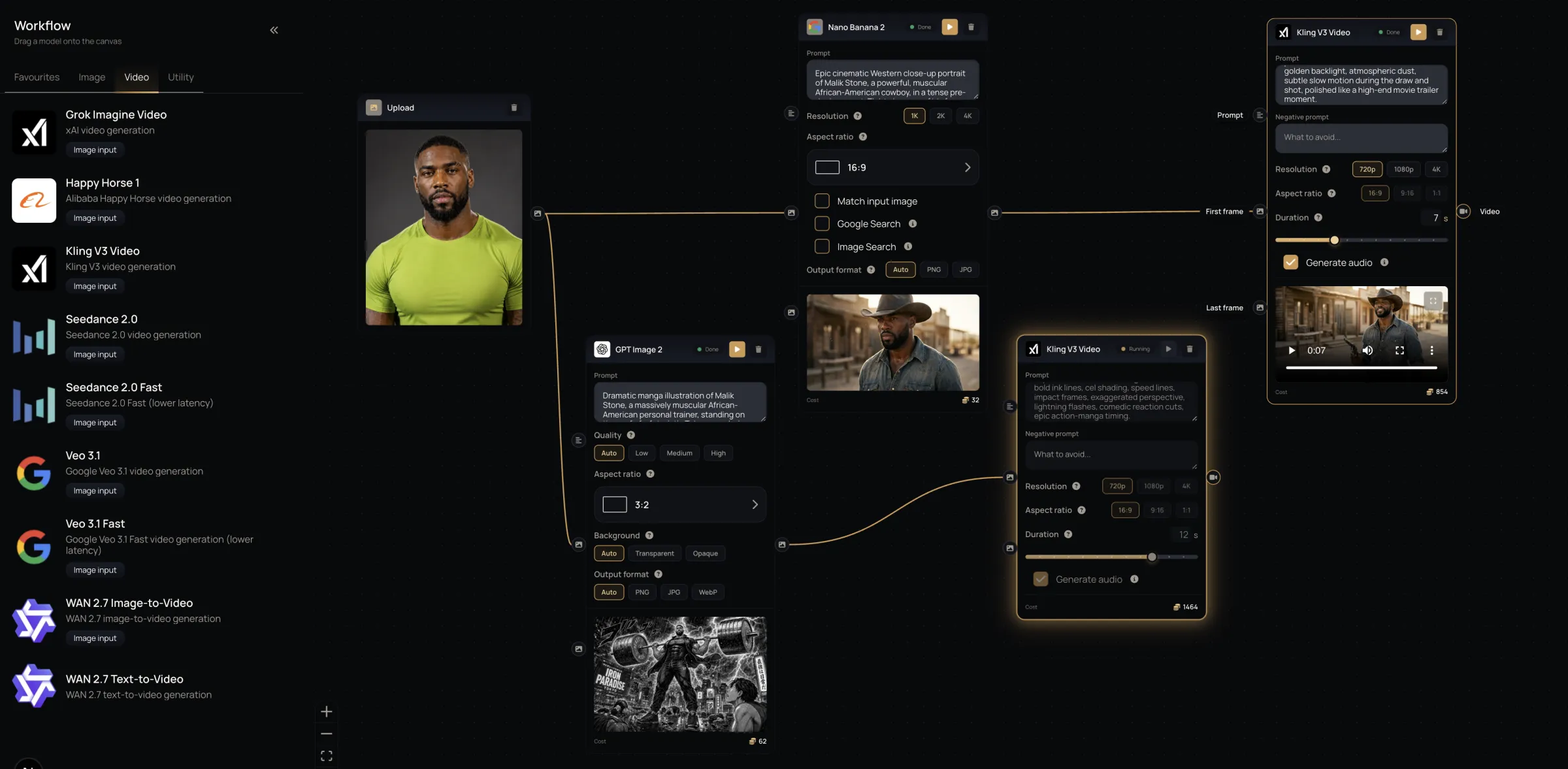
A model palette on the left, and a canvas where every step is a block you can see.
Press run once. Every step follows.
A recipe runs step by step, in the order you wired it, each model picking up where the last one left off. No re-prompting, no carrying results between tabs by hand.
- Live status on every step as the run moves along
- Run a single step on its own, or the whole chain
- Stop a run part-way through
See the price before you press run.
Every step shows its own credit cost, and the canvas totals them for you — so you know what a run costs before you start it, not after.
- Cost on every card
- A running total for the whole recipe
- Each step charged at the price shown
Send the whole recipe as a link.
Share a recipe as a copy link: whoever opens it gets their own editable copy in their account, and yours stays exactly as you left it.
- Copy link — an editable copy in their account
- Your original is untouched by whatever they change
- Revoke any link at any time
Your recipes travel.
Export any recipe to a file and import it back — into another account, another team, or a backup.
- One file per recipe
- Import reports exactly what came through
- Older exports are migrated forward on import
Stop rebuilding the same workflow.
The Recipe engine is live in Alberti Studio, on every paid plan. Build your first recipe today and stop wiring the same chain by hand.
Explore plans